How to access the admin settings on your ELMO Cast

How to access the admin settings on your ELMO Cast

Your ELMO Cast's settings can be configure by connecting to its Admin panel from a web browser. 

This guide assumes it is your first time setting up your device or that your device is not configured to use your network yet. If your device is already connected to your network, please skip to step 2 and use the Infrastructure IP.    

1. Find the SSID and Network password for your ELMO Cast. Using a computer or smartphone, connect to the ELMO Cast's SSID the same way you would connect to a normal WiFi network.
Your computer/smartphone will likely lose connection to the outside internet until you disconnect from the ELMO's SSID.  


2. Enter the Direct Link IP Address into your web browser to open the setting panel. We recommend using a modern version of Chrome (or Chromium based) or Safari web browser with all ad blockers disabled.

3. Enter the Admin pin to gain full settings access. By default the password is 000000. This admin pin is not the same as the Device Password from Step 1.  
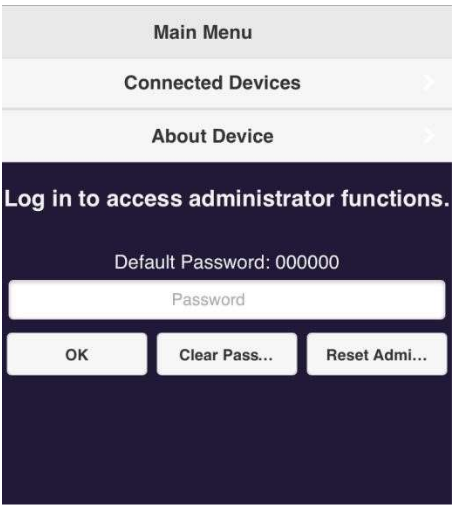


When you are finished making changes, make sure you change your phone / computer back to your standard WiFi network. 
    • Related Articles

    • Connecting ELMO Cast to a hidden network

      You can manually enter a SSID for your ELMO Cast to connect to using the administrator portal. How to access the admin settings on your ELMO Cast Under the Network Management menu, select Connect to 5GHz and then Add Network. You will then be ...
    • How to hide ELMO Cast SSID and Password

      From the ELMO Cast's admin panel, you can set the device to hide the password and SSID. This is useful to limit who can connect to your device directly. How to access the admin settings on your ELMO Cast For the SSID, under Device Management and ...
    • How to change the background image on ELMO Cast

      You can change the background image on your ELMO Cast using the settings menu. The image should be 1920x1080 in resolution, 2MB or lower in file size, and must be in PNG format. Once you overwrite the background image, you can not go back to the ...
    • ELMO Cast connection stability issues

      If you are having connection stability issues (can't connect, dropped connections, no web gui) with your ELMO Cast, please try the following - 1. Use an USB AC adapter instead of connecting the USB power to the display. 2. Reset the ELMO Cast. Next ...
    • ELMO Cast Product Support

      Having trouble setting up your ELMO Cast? Use this article to troubleshoot common issues and get answers to your questions! Troubleshooting Problem: Forgot Login. Solution: Press and hold the reset button for 8 seconds to reset the device. The login ...