MX-P2 Overview

MX-P2 Overview


Use this article to learn more about your new ELMO device. For troubleshooting, please see our 
device help page.

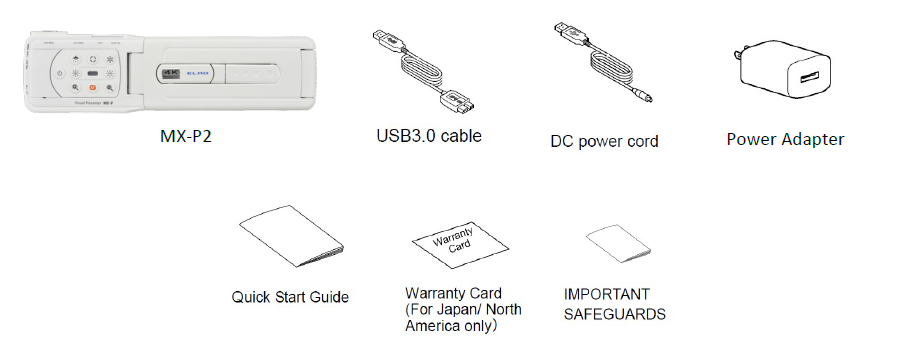
Package Contents
Supported Software

Windows 7 / 8 / 8.1 / 10 / 11
      - Image Mate 5
      - ELMO Interactive Toolbox for Windows
      - Image Mate + Cloud
      - Image Mate 4
MacOS 10.14 +
      - Image Mate 5
      - ELMO Interactive Toolbox for Mac
      - Image Mate + Cloud
ChromeOS
      - Image Mate + Cloud

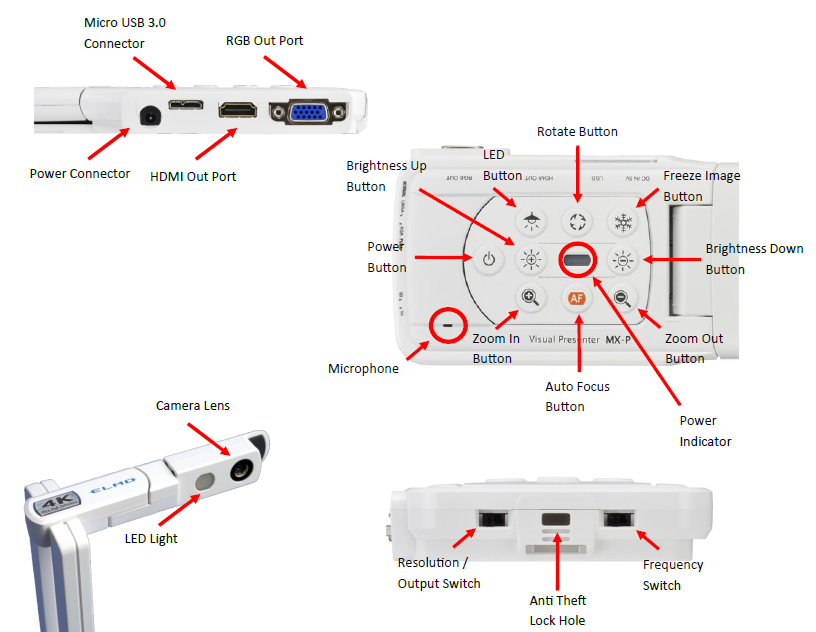
Part Identification


    • Related Articles

    • MX-P Product Support

      Having trouble setting up your MX-P document camera? Use this article to troubleshoot common issues and get answers to your questions! Troubleshooting Problem: Camera not recognized / No image from camera Solution: Change cable and/or input port. ...
    • MX-1 and MX-P Firmware update

      This guide is intended for advanced users only. You will need administrator level permissions on your system to continue. This process is only possible on a Windows 10 or 11 machine at this time. This guide will show you how to update the firmware of ...
    • MX-1 and MX-P camera not connecting to Windows computers

      We have recently been made aware that an update pushed by Microsoft to some Windows computers may be causing connection and driver problems with MX-1 and MX-P cameras. Affected Windows builds include those released in late December 2024 and January ...
    • MX-P3 Overview

      Use this article to learn more about your new ELMO device. Package Contents Supported Software Windows 7 / 8 / 8.1 / 10 / 11 - Image Mate 5 - ELMO Interactive Toolbox for Windows - Image Mate + Cloud - Image Mate 4 MacOS 10.14 + - Image Mate 5 - ELMO ...
    • Factory Reset MX-P3

      If you are having trouble with your MX-P3, please follow the steps below to factory reset it. 1. Unplug everything from the camera. 2. With one hand, hold down the LED Lamp button and Freeze Image Button (7 + 9). 3. With the other hand, connect a ...