EIT Mode Switching
When using the Interactive Toolbox, it is possible to hide the software to regain control of your machine.
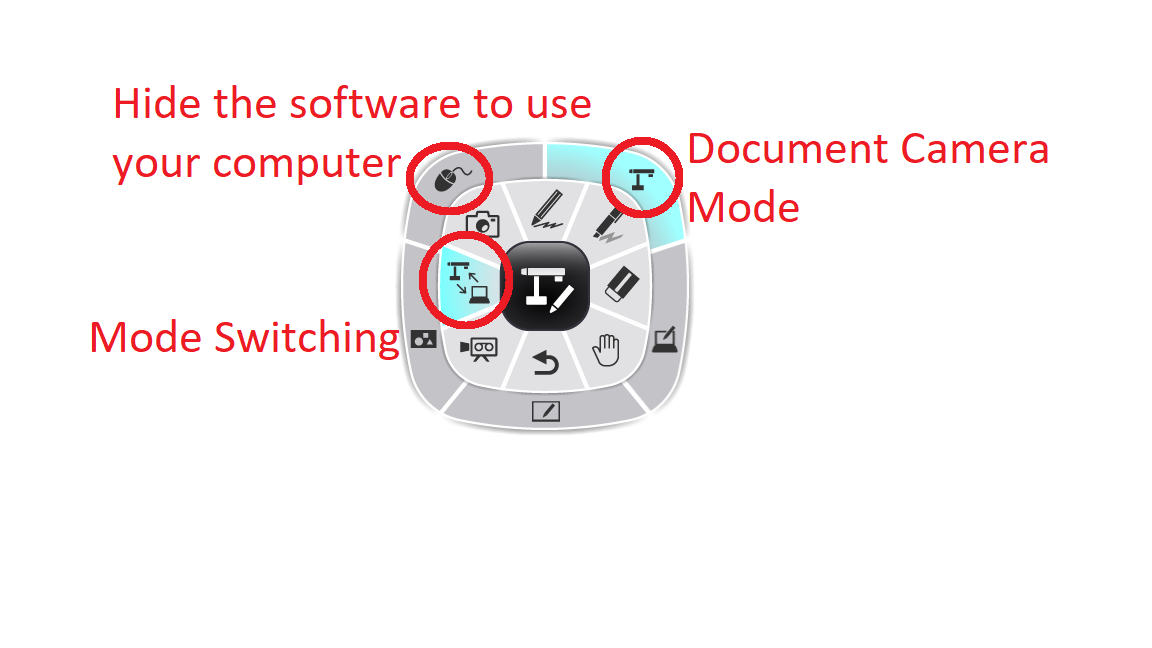
First, select the Mode Switching feature. Then, you can choose the Mouse icon to hide the software.
To reopen the software, find the small tool wheel on your screen and select the Doc Cam button.
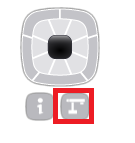
First, select the Mode Switching feature. Then, you can choose the Mouse icon to hide the software.
To reopen the software, find the small tool wheel on your screen and select the Doc Cam button.
Related Articles
ELMO Interactive Toolbox Troubleshooting
Need help using the ELMO Interactive Toolbox software? Start here! Download: https://www.elmousa.com/software/ Supported Systems Windows 7 / 8 / 8.1 / 10 MacOS 10.14 / 10.15 / 11.X Supported ELMO Devices Compatibility is not the same across all ...ELMO Interactive Toolbox Manual
Download the EIT user manual below:M1 and M2 Mac Notice - Frozen Mouse / Black Screen Issue
This guide will show you how to fix the compatibility issues with ELMO Interactive Toolbox and Apple M1 /M2 computers. Please note that this guide assumes you have already installed and tested ELMO Interactive Toolbox on your computer. For help ...EIT Recording Quality
Using the Recording Settings menu, you can adjust the recording quality of EIT.EIT System Slowdown / Lag
If the EIT software is causing your system(s) to slowdown, you may need to change the live image settings.