Improve performance of ELMO Interactive Toolbox on Windows PC
If your camera image is laggy, delayed, or pixelated, please try one of the follow to potentially improve performance.
1. Use a direct USB connection between the camera and your computer. Using USB hubs / extenders can cause performance to drop significantly.
2. Enable a higher power plan in your control panel. Power saving modes can cause the software to lag or have a delay.
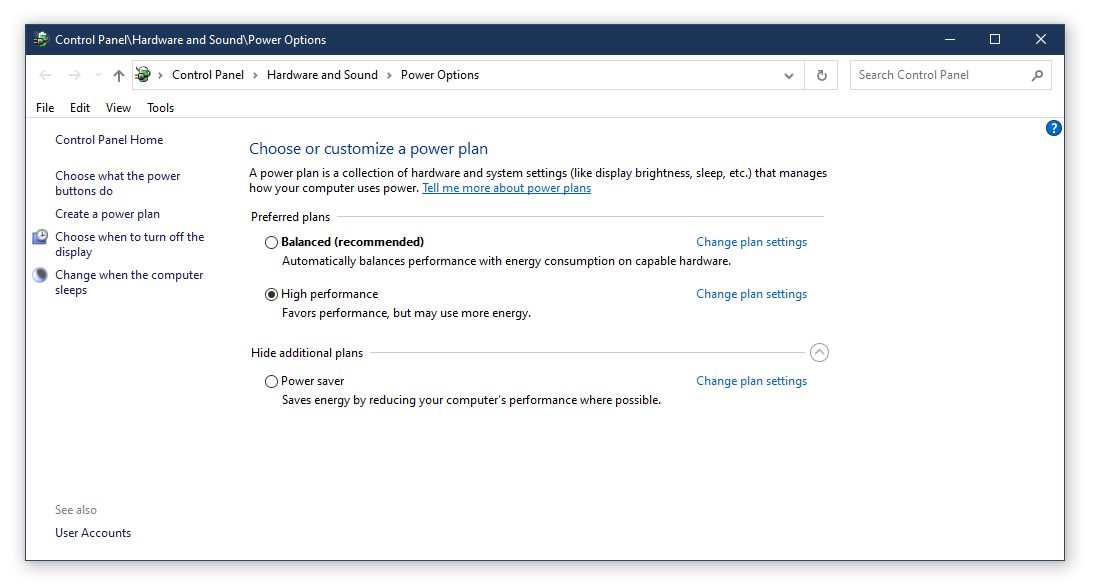
1. Use a direct USB connection between the camera and your computer. Using USB hubs / extenders can cause performance to drop significantly.
2. Enable a higher power plan in your control panel. Power saving modes can cause the software to lag or have a delay.
3. Close other programs running on your computer while the ELMO software is open.
4. Reboot your computer. It is recommended that users shutdown their computers when not in use, or reboot them periodically during long sessions of use.
5. Try disconnecting other USB devices from your computer while the ELMO is plugged in.
6. Always use the latest software available from our website. You can download the latest versions from https://www.elmousa.com/software/ . You should also update your computer with Windows Update whenever a new update is avalible.
Related Articles
Improve performance of Image Mate 5 on Windows PC
If your camera image is laggy, delayed, or pixelated, please try one of the follow to potentially improve performance. 1. Use a direct USB connection between the camera and your computer. Using USB hubs / extenders can cause performance to drop ...ELMO Interactive Toolbox Troubleshooting
Need help using the ELMO Interactive Toolbox software? Start here! Download: https://www.elmousa.com/software/ Supported Systems Windows 7 / 8 / 8.1 / 10 MacOS 10.14 / 10.15 / 11.X Supported ELMO Devices Compatibility is not the same across all ...ELMO Interactive Toolbox Manual
Download the EIT user manual below:How to change ELMO Interactive Toolbox settings - Windows
The ELMO Interactive Toolbox's settings can be adjusted using the EIT Setting Tool app. This includes the default save folder for videos and pictures, and the theme of the Tool Wheel. This app can normally be found in your installation folder. By ...Record video with the ELMO Interactive Toolbox
On Windows - Recordings and screenshots are saved in your Pictures folder inside the ELMO Interactive Toolbox\rec directory. On MacOS - Recordings and screenshots are saved in your Home folder inside the ELMO Interactive Toolbox/rec directory. The ...