How to hide ELMO Cast SSID and Password
From the ELMO Cast's admin panel, you can set the device to hide the password and SSID. This is useful to limit who can connect to your device directly.
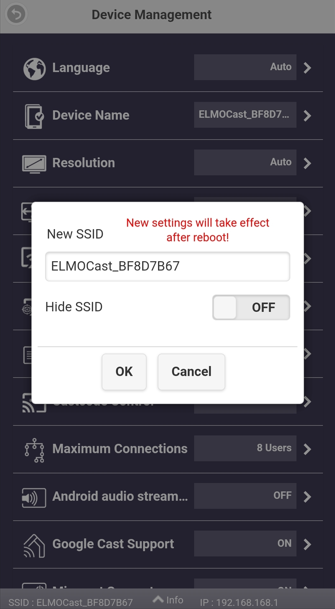
For the SSID, under Device Management and Device Name is the hide toggle.
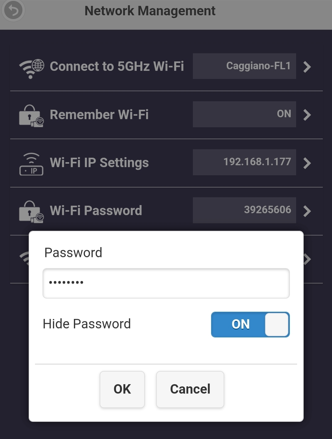
For the password, look in the Network Management menu for Wi-Fi Password.

For the SSID, under Device Management and Device Name is the hide toggle.
For the password, look in the Network Management menu for Wi-Fi Password.
Related Articles
Connecting ELMO Cast to a hidden network
You can manually enter a SSID for your ELMO Cast to connect to using the administrator portal. How to access the admin settings on your ELMO Cast Under the Network Management menu, select Connect to 5GHz and then Add Network. You will then be ...How to access the admin settings on your ELMO Cast
Your ELMO Cast's settings can be configure by connecting to its Admin panel from a web browser. This guide assumes it is your first time setting up your device or that your device is not configured to use your network yet. If your device is already ...ELMO Cast Product Support
Having trouble setting up your ELMO Cast? Use this article to troubleshoot common issues and get answers to your questions! Troubleshooting Problem: Forgot Login. Solution: Press and hold the reset button for 8 seconds to reset the device. The login ...ELMO Cast connection stability issues
If you are having connection stability issues (can't connect, dropped connections, no web gui) with your ELMO Cast, please try the following - 1. Use an USB AC adapter instead of connecting the USB power to the display. 2. Reset the ELMO Cast. Next ...ELMO Cast Overview
Use this article to learn more about your new ELMO device. For troubleshooting, please see our device help page. Package Contents System Requirements Part Identification Download PDF Version: